My dad is doing some reorganizing of his DDM Garage Doors web site. He recently put up a comprehensive overview of garage door springs that covers both torsion springs and extension springs. He’s got over 6000 springs for sale to do-it-yourselfers who feel confident in how to replace their own springs after reading my dad’s spring replacement tutorial. I’m working on finishing up a shopping cart application to facilitate easier ordering and purchasing of the right spring for your needs. It’s tough to balance that with my “real” job, wedding preparation, friends, and other activities.
Blog Archives: 2009
How to Enable Gmail Themes in Google Apps for My Domain
A while back, I found out about the Google Apps service that allows you to host Google applications, such as Mail, Chat, Calendar, Sites, and Docs using your own domain name. I set this up for erichmusick.com and have been using it for quite some time. I’m hoping to set this up for my fiancee, Ellen, once we get married. She’s a big fan of Gmail’s themes, so I wanted to make sure Google made this functionality available in Apps Mail. When I looked in my Settings initially, I did not see the option to use a different theme. After doing a little digging, I found out how to enable themes for my domain’s Google Mail application.
Enabling Themes for Google Apps Mail accounts
- Log on to your Google Apps control panel. The URL will look something like https://www.google.com/a/cpanel/yourdomain.com/Dashboard
- After logging in, from the navigation across the top, click the Domain Settings button.
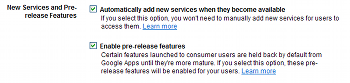
- Under New Services and Pre-release Features, there are two check boxes. Click both of them:
- Click the Save changes button.
I cannot guarantee that this will enable themes for your instance of Google Apps Mail. However, this is what worked for me and, assuming that Google has rolled this out to all their Apps users, this should work for you as well!
